A free Chrome extension for survey programmers, researchers and Qualtrics partners.
QA Runner answers every question on each page, clicks Next until the end, and follows test plans that pin the answers driving your routing. It checks required questions as it goes and hands you the evidence as CSV files.
No account. No server. No AI guessing. Everything runs in your browser, and the same seed always gives the same answers. Privacy details
Every route needs its own pass. Required settings and Other boxes are easy to miss. And when a client asks what was tested, the only answer is "we clicked through it".
Someone answers every page by hand, once for each route through the survey, and starts again after every change. Required questions that aren't enforced slip through. Questions that never appear go unnoticed. There's no record of which answers were tried.
QA Runner answers every page for you and runs each route as its own scenario, in a fresh session. Required settings are checked as it goes. Every answer it gives is logged, and the same seed reproduces any run exactly after a fix.
A quick run checks the whole survey. A test plan proves the routes that matter.
Install QA Runner from the Chrome Web Store, open a Qualtrics preview or live link, and click the extension icon. The side panel recognises the survey and the link type.
Click Run to end. QA Runner answers every question on each page, checks each answer went in, clicks Next, and keeps going until the end of the survey.
Load every question from the survey builder or a QSF, pick the questions that drive your routing, and choose the answers to try. QA Runner turns them into scenarios.
Each scenario shows whether its pinned questions were shown and answered. Download the results, every answer given and the required checks as CSV files.
A customer experience survey with routing, required questions and an Other box, run, planned and checked.
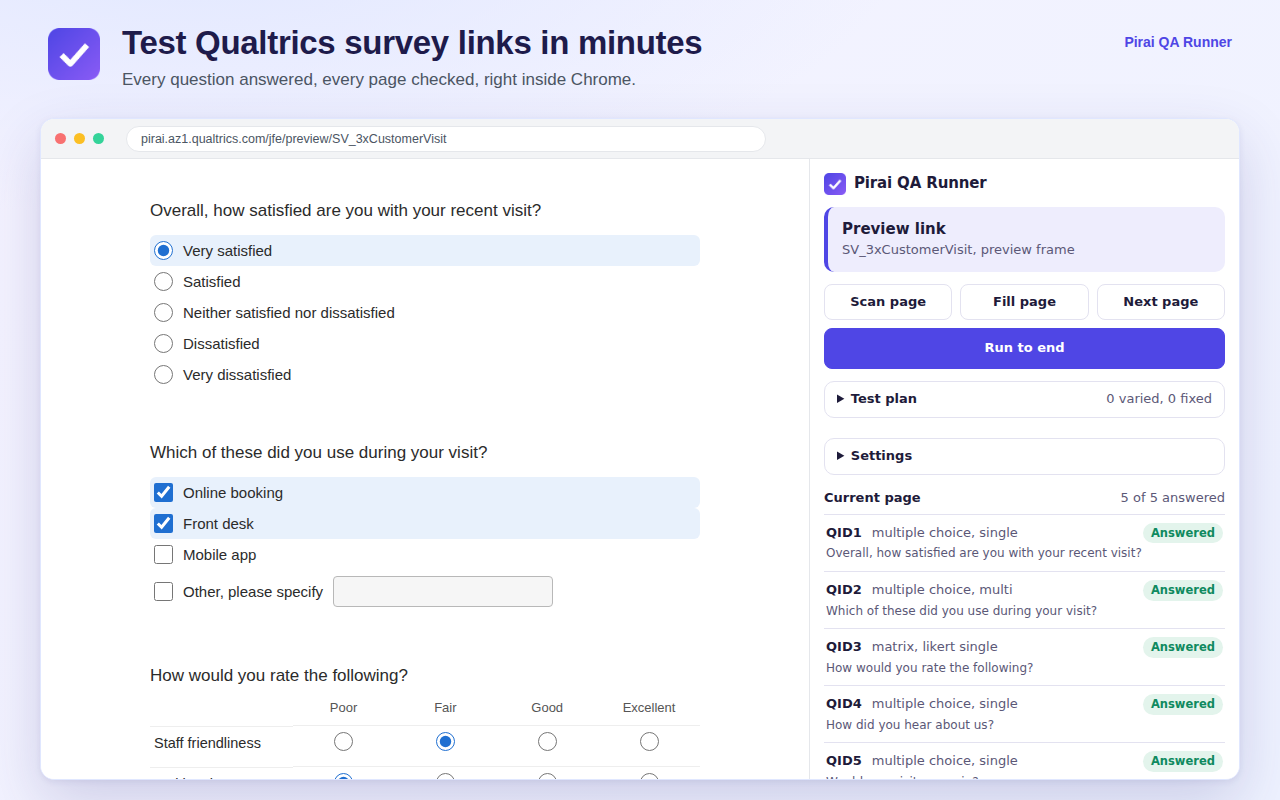
Every question answered on the page, with each one confirmed in the panel.
Each type is answered the way a respondent would, then checked to make sure the answer went in.
One or several answers per question, with Other, please specify text filled in.
Dropdown lists, on their own or inside a matrix table.
Single line, multi line, essay, password and form fields.
Likert single and multi answer, bipolar, constant sum and text entry grids.
One different statement chosen for each column, as MaxDiff requires.
Handle, bar and star sliders, set to values within their range.
Each column answered with its own widget, from radios to text.
Items dragged into groups with real mouse input, the way respondents do it.
From a quick run on a new link to proving every route before a client signs off.
Pick the questions that drive your routing and the answers to try. QA Runner builds the scenarios and runs each one in a fresh session.
Load every question from your open Qualtrics survey builder tab, or from a QSF, and pick questions from any page, not just the one in front of you.
Finds questions that are required but not enforced, enforced but not marked, and Other boxes that need text. Works even when the asterisk is hidden.
Answers come from a seed, so the same seed gives the same answers every time. Rerun a plan after a fix and compare.
Download the results, a readable log of every answer given, and the required checks as CSV files, ready for Excel and client sign off.
Each scenario reports whether every pinned question was shown and answered, so a question that never appears stands out straight away.
Pick, group and rank questions only accept real mouse input. QA Runner provides it, so those questions are answered too.
Download a test plan with the survey it was made for, share it with your team, and upload it again for the next round of testing.
Everything runs in your browser. No account, no tracking, and nothing is sent to Pirai AI or any other server.
No account, no subscription, no usage limits.
Install it from the Chrome Web Store and test your first survey link in minutes. Use preview links for testing: runs on live links are recorded as responses and count towards quotas.
Add to ChromeTest every client survey before launch and hand over evidence of what was checked, without hours of clicking through links.
Prove screeners, routing and follow up questions behave as the questionnaire says, and catch required settings and Other boxes before anyone else does.
Check recurring and translated surveys quickly every time a question, block or piece of logic changes.
Pirai QA Runner is a free Chrome extension that tests Qualtrics survey links. It answers every question on each page, clicks Next until the end of the survey, follows test plans you create, and reports what worked, all from a side panel in Chrome.
No. Answers come from a seed, so the same seed on the same survey always gives the same answers, and any run can be repeated exactly. Questions you pin in a test plan always get the answers you chose.
On preview links, no. On live links, each run is submitted as a real response and counts towards quotas, the same as if you answered the survey yourself. The panel turns amber on live links as a reminder, so use the preview link where you can.
A test plan lists the questions that drive your survey routing and the answers to try for each. QA Runner turns it into scenarios, runs each one in a fresh session, and reports whether every pinned question was shown and answered. Plans can be downloaded as files to reuse or share.
Yes. With required checks turned on, QA Runner clicks Next before answering and records which questions block it. It reports questions that are required but not enforced, enforced but not marked, and Other, please specify boxes that need text. It reads the required setting even when the asterisk is hidden.
No. QA Runner never asks for or reads your password or cookies. When you load questions from the survey builder, the request runs inside your own signed in builder tab.
Multiple choice, dropdowns, text entry, forms, matrix tables (Likert, bipolar, dropdown, constant sum, text entry and MaxDiff), sliders, side by side, and pick, group and rank, in Qualtrics' current survey layout.
Nowhere. Everything runs in your browser, and nothing is sent to Pirai AI or any other server. Results are saved to your computer only when you download them.
Pirai QA Runner is free.
Read exactly what QA Runner handles, and what it never collects, in our privacy policy.
Add QA Runner to Chrome and run your first survey in minutes. Testing on another survey platform, or want a walkthrough for your team? Send us a note.
